To structure content for AI answers, put a direct answer under every heading, then support it with short paragraphs, lists, and tables. Write each passage so it stands on its own. Use clear headings, define terms in one or two sentences, and add proof such as data or named sources. AI tools pull passages, not whole pages, so clean structure makes your content easier to find, extract, and cite.
Key Takeaways
- To structure content for AI answers, write each section as a standalone answer, because AI tools pull short passages.
- Lead every section with a direct answer, then add context and proof.
- Use clear headings that match your audience’s questions.
- Use numbered lists for steps, bullets for sets, and tables for comparisons.
- Add named sources, data, and examples to every important claim.
- Test your pages by asking the same questions in AI tools and checking for citations.
- Remember that good structure for AI answers supports solid SEO but does not replace quality content.
Table of Contents
Why AI Tools Skip Many Web Pages

AI tools skip pages that bury the answer. They favor short passages that are clear, complete, and self-contained, so a page with buried answers loses to a competitor’s cleaner section.
You publish a helpful post, ask ChatGPT or Google the same question, and find your page missing from the answer. A competitor’s thinner post earns the citation instead, meaning the answer links to that page as a source.
Sometimes the problem is organization, not writing quality.
In this guide, AI tools include chatbots such as ChatGPT and Perplexity, plus Google features called AI Overviews and AI Mode. AI Overviews are AI-written summaries at the top of some search results. AI Mode is a chat-style way to search Google.
This guide shows you how to structure content for AI answers, one step at a time. It builds on the framework in our guide to AI search engine optimization. Read that first for the big picture.
You will learn what structure means, why it matters, and how to build a citable page. You will also get copy-ready templates, a before-and-after rewrite, and an audit checklist. Everything here works in your regular editor.
What It Means to Structure Content for AI Answers
A Simple Definition
Structuring content for AI answers means organizing each page into short, self-contained passages, each answering one question. Every passage starts with the answer, sits under a clear heading, and includes enough context to stand alone. This lets AI tools find, extract, and cite your words.
Think of structure as packaging. Your expertise is the product, and structure is the box that lets an AI tool pick it up intact.
How AI Tools Read Your Page
AI search tools scan a page for passages that match a question, then pull the best ones into an answer. Learn more in our guide on how AI search engines work.
Google says AI Overviews and AI Mode can run related searches across subtopics (Google Search Central). The system then builds one response from the results. Each section of your page therefore competes on its own. A weak section can lose even when the rest of the page is strong.
Structure Versus Schema Markup
Structure is what readers see: headings, lists, tables, and short paragraphs. Schema markup, also called structured data, is code that labels your content for machines. You need both, but structure comes first because markup cannot fix a confusing page.
Once your layout is clean, add structured data for AI search to reinforce it.
Why Beginners Have an Edge
A repeatable habit builds clear pages better than a large team does. Large sites maintain more content, which makes consistent structure harder. A small site with clean, answer-first sections competes on clarity.
Why Structure Helps AI Tools Cite Your Page

Structure helps AI tools cite your page by making each passage easy to find, understand, and quote. The evidence is early and mixed. Some research shows visibility gains for certain content changes, while Google says AI features need no special optimization (Google Search Central). Treat structure as good practice, not a guaranteed ranking trick.
AI Answers Change How People Click
AI summaries are changing click behavior. An analysis of browsing data from 900 U.S. adults in March 2025 compared searches with and without an AI summary. Visits with a summary produced a click on a regular search result 8% of the time, versus 15% without one (Pew Research Center).
Users rarely clicked links inside the AI summary itself. Your goal therefore shifts: you still want clicks, and you also want your brand named inside the answer. A citation builds the familiarity that brings readers back later.
More recent industry data points the same way. Seer Interactive tracked 53 brands. On searches with an AI Overview, their organic click-through rate fell to 1.3% in December 2025. That rate is the share of searches that end in a click on a regular result. It recovered to 2.4% by February 2026 but still trails the 3.8% rate for searches with no AI Overview. Pages cited inside an AI Overview earned about 2.1%, versus about 0.9% for uncited pages (Search Engine Land).
What Research and Google Say About Structure

Research on generative engines suggests that clear, well-supported passages are easier to cite, but Google stresses that quality comes first.
Clear Structure Makes Passages Easier to Quote
Researchers from Princeton and other institutions tested ways to improve visibility in generative engines, AI search tools that write answers. They reported gains of up to 40% from methods such as adding citations, quotations, and statistics (Princeton GEO study). Results varied by topic, so treat them as a direction, not a promise.
Google’s guidance is measured. It says AI Overviews and AI Mode need no additional requirements or special optimizations (Google Search Central). Clear structure supports those SEO basics by making your content easy for people and machines to understand.
Quality Still Comes First
Structure cannot turn thin content into a strong answer. Google says unique, useful content will likely influence AI search visibility more than its other tips (Google Search Central). Build your structure around real expertise.
The Anatomy of a Citable Page
A citable page opens with a short answer, divides the body into single-question sections, and closes with a checklist. Each part has one job and a target size. The table below shows the pattern you will build.
| Page Element | Its Job | Target Size |
| Quick Answer | Answers the main question at once | 60-80 words |
| Key Takeaways | Summarizes the whole page | 5-8 bullets |
| Headings | Label each topic clearly | 10 words or fewer |
| Answer blocks | Give one self-contained answer | 40-60 words |
| Lists and steps | Make sequences easy to follow and quote | 3-8 items |
| Tables | Compare options side by side | 3-4 columns |
| Checklist | Recaps the framework | 8-12 items |
The Top Block
Open with a short answer and a takeaway list. This mirrors the inverted pyramid, where the most important facts come first. Readers get value in seconds, and AI tools get a clean passage to quote.
The Body
Divide the body into sections that each answer one question. Give each section a heading, an answer block, and supporting details. An answer block is a short passage that answers the section’s question on its own. Keep paragraphs to two to four sentences so that AI tools can extract every passage easily.
The Close
End with a checklist and a short conclusion. The checklist recaps your framework in a format people save, and AI tools can quote. The conclusion repeats the main answer and gives one next step. Together, these parts make a page that readers scan and AI tools quote easily.
Principles That Guide Every Structure Decision
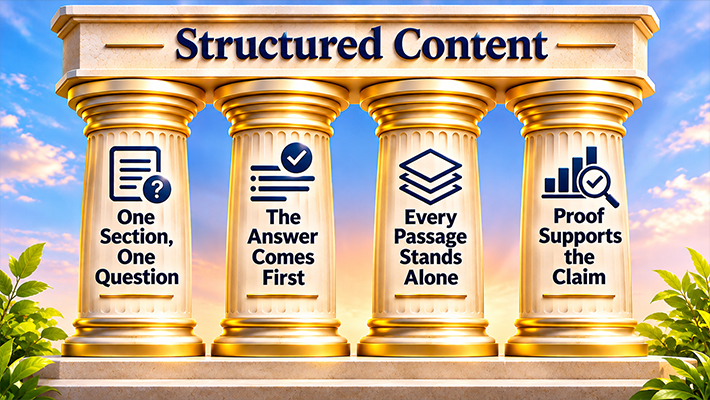
Four principles drive every structure decision: one section answers one question, the answer comes first, every passage stands alone, and proof supports each claim. They explain why the steps below work and guide you when a page fits no template.
Principle 1: One Section, One Question
Each section answers one question; split any section that answers two. Narrow sections give AI tools cleaner passages and readers a faster path to what they need.
Principle 2: The Answer Comes First
Give readers the point immediately: state the answer, then explain it. This habit helps AI tools find the point and saves readers time.
Principle 3: Every Passage Stands Alone
Assume any passage can appear alone in an AI answer. Name the topic, define key terms, and replace references such as “as noted earlier” with the term itself. Standalone passages make sense when quoted out of order.
Principle 4: Proof Supports the Claim
Readers and AI tools skip unsupported claims. Add a number, a source, or an example beside each major claim, because proof turns a clean passage into a trustworthy one.
How to Structure Content for AI Answers in 7 Steps
Follow these steps in order each time you build a new page or refresh an old one.
Step 1: Start With One Real Question
Pick one main question per page, using real wording from customer emails, search suggestions, and the People Also Ask box. A page that tackles ten loose questions answers none of them well.
Write the question down before you draft, and trace every heading back to it.
Step 2: Write the Answer First
Place a direct answer in the first one or two sentences under each heading. Aim for 40-60 words in a full answer block, a practical guideline rather than a proven threshold. Use a shorter answer for small subsections. Then add context, examples, and proof below it.
This habit also helps you win featured snippets. These are the answer boxes at the top of some Google results, and they use the same answer-first format.
Step 3: Turn Headings Into Clear Labels
A heading tells readers and machines exactly what the section answers. Compare “Getting Started” with “How to Write a Meta Description.” The second one matches a real query. Our guide to effective subheadings covers the craft in more detail.
Headings come in levels: the H1 is the page title, H2s label main topics, and H3s label subtopics. Never skip a level, such as going from H2 to H4.
Step 4: Split Content Into Short Passages
Limit each paragraph to one idea in two to four sentences. Name the topic inside the passage instead of writing “it” or “this.” A passage that says “a meta description” makes sense alone; one that says “it” does not.
The final three steps cover format, proof, and testing. Match each format to its content, support every key claim, and check the results in AI tools.
Step 5: Use Lists, Steps, and Tables Where They Fit
Match the format to the content: use numbered lists for processes, bullets for sets of items, and tables for comparisons. Limit each bullet to one or two sentences.
Use a paragraph where a paragraph reads better. Format should clarify, not decorate, and your choices shape how well AI tools extract each passage.
Step 6: Add Proof to Every Key Claim
Support important claims with data, named sources, or concrete examples. Link to primary sources such as Google Search Central, Pew Research Center, or academic papers. Proof gives AI tools a reason to trust your passage. Our guide to optimizing content for AI Overviews explains more trust signals.
Step 7: Test Your Structure in AI Tools
Ask your target question in ChatGPT, Perplexity, and Google AI Mode. Note whether your page appears as a source and what the answer says. If a competitor wins, compare their structure to yours. Use a logged-out or private window because answers vary by account and session.
Repeat the test monthly: AI answers change, and your results change with them.
How to Write Strong AI-Ready Blocks
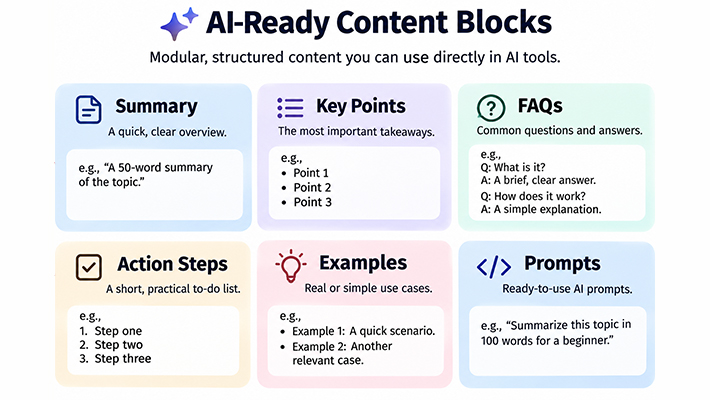
An AI-ready block is the smallest unit of your structure. It answers one question or defines one term in 40-60 words and makes sense when someone quotes it alone.
Four Rules for Every Block
- Open with a direct answer in the first sentence.
- Add one supporting fact or reason.
- Add one example or condition when space allows.
- Name the topic in full throughout, so no pronoun carries the meaning.
Two Sample Blocks
Definition block: Query fan-out is a technique where an AI search system splits one question into several related searches. It then combines the results into one answer. A page that covers a topic’s sub-questions gives the system more chances to cite it.
Explainer block: Internal links connect related pages on your site through descriptive anchor text, the clickable words of a link. They help readers find more answers and help search systems see how your topics relate. Use a clear noun phrase as the anchor, not “click here.” Each link acts as a signpost.
How to Check Block Length
Paste your block into a word counter. If it runs over 60 words, cut the weakest sentence. If it runs under 40, add one example or condition.
When a Block Should Run Longer
Some topics need more room. Give the short answer first, then expand in the paragraphs below it. The short answer works on its own, and the detail serves readers who want more.
Passage Patterns You Can Copy

Four patterns cover most posts: definition, steps, comparison, and question and answer. Templates save time and keep your structure consistent.
The Definition Pattern
Use this pattern when you introduce a term. Replace the brackets with your own words.
Template: [Term] is [category] that [main function]. It helps you [benefit]. You use it when [situation].
Example: A content audit is a review of every page on your site. It helps you find weak, outdated, or duplicate posts. You use it when traffic stalls.
The Steps Pattern
Use this pattern for any process. Start with a one-sentence lead-in, add a numbered list, and close with the result.
- Write a lead-in that names the goal and the number of steps.
- List each step as a short command starting with a verb.
- Add one sentence of detail under each step when needed.
- Close with the result the reader should expect.
The Comparison Pattern
Use a table to compare two or more options. Pick three or four criteria, keep each cell short, and add one sentence that states your verdict.
| Criteria | Weak Passage | Strong Passage |
| Answer position | Buried in paragraph three | Opens the section |
| Heading | Vague label | Names the exact question |
| Context | Relies on “it” and “this” | Names the topic every time |
| Format | One long block of text | Short paragraphs, list, or table |
| Proof | Unnamed claims | Named source or example |
The Question and Answer Pattern
Use a question as the heading, then answer it in 40-60 words. Add one short paragraph of detail below. This pattern fits FAQs, glossary entries, and quick explainers.
Best Structure by Post Type

Match the layout to the reader’s goal. How-to guides use numbered steps, explainers use short H3 sections, comparisons use tables, and list posts use parallel H3 items. The table gives a quick view, and the sections below add detail.
| Post Type | Best Opening | Key Format |
| How-to guide | Lead-in with the goal and step count | Numbered steps |
| Explainer | One-sentence definition | Short sections with H3s |
| Comparison | Verdict and summary table | Side-by-side table |
| List post | One-sentence answer per item | Parallel H3 items |
How-To Posts
Start with a lead-in that states the goal and the number of steps. Write each step as a short command that begins with a verb. Add one sentence of detail so readers know what success looks like. Close with a mistakes section and a checklist. How-to posts are the easiest format to structure because the numbered list gives AI tools a clear sequence to quote. Give every step one action, and split any step that needs two.
Definition and Explainer Posts
Open with a one-sentence definition that names the term and its category, then cover why the topic matters, how it works, and one example. Place each part under its own H3 to keep ideas separate. If your post uses many terms, add a two-column glossary table near the end. Define each term the first time it appears. Pair each definition with a short example from your own work because real examples build trust and show experience.
Comparison Posts
Place a summary table near the top, then state your verdict in one or two sentences. Give each option its own H3 and say who it suits. Apply identical criteria to every option, such as price, ease of use, and best use case. Readers and AI tools then compare options cleanly. Keep table cells short. Replace vague words like “good” or “better” with the specific reason an option fits a reader, and disclose each weakness. Honest trade-offs make your verdict credible.
List Posts
Give each item an H3 and a one-sentence answer before the detail. Keep items parallel in length and tone so readers can scan them. Number the list only when order matters, as with ranked tools or ordered steps. Name the topic in each item’s first sentence so it stands alone. Cut padding that exists only to reach a round number. Ten strong items serve readers better than twenty weak ones and give AI tools cleaner passages. Short, clear items are also easier to refresh later.
Before and After: Rewriting a Weak Section
A strong rewrite opens with the definition, names the topic in every sentence, and ends with an action. This example answers the question “What is a meta description?”
The Weak Version
“Meta descriptions are one of those things people often wonder about. They show up in search in various situations, and Google might use them or not, depending on the page. Many marketers write them differently.”
This passage never defines the term, hides the answer, uses vague words, and gives readers nothing to act on.
The Strong Version
“A meta description is a summary of a page that can appear under your title in search results. It does not directly raise rankings, but a clear one can earn more clicks. Write one or two sentences that state the page’s main benefit.”
What Changed
- The definition now opens the passage.
- The topic is named in every sentence, so the passage works alone.
- The second sentence adds useful context.
- The last sentence gives a clear action.
The strong version runs 44 words, short enough to quote and complete enough to trust.
Write for Readers & AI at the Same Time

Write short, active sentences at a ninth-grade level so people and machines can follow them. Structure works best with easy-to-read writing.
Keep Sentences Short
Aim for sentences under 20 words since short sentences hold one idea each and are easier to quote and understand. Read your draft aloud, and shorten any sentence that makes you pause.
Prefer Active Voice
Active voice names who does what, so “Google pulls passages” beats “passages.” Active sentences run shorter and carry more meaning. Reserve passive voice for cases where the actor is unimportant.
Aim for a Ninth-Grade Reading Level
Your audience skims and studies in turns. Plain words serve both habits. Replace jargon with everyday terms, or define it on first use. Free tools such as Hemingway Editor flag hard sentences.
Keep Your Own Voice
Keep structure from making you sound robotic. Add a personal example or short story where it fits. Readers trust a human voice, and authentic detail shows real experience.
Common Mistakes When You Structure Content for AI Answers
Most structural mistakes come from habits built for print or older SEO.
Burying the Answer
Many writers open with background and build up to the answer. AI tools may grab the background and skip the point, and readers lose patience too. Put the answer in the first sentence under each heading, then explain it. If you cannot state the answer in one sentence, narrow the question before you write.
Writing Vague Headings
Headings like “Overview” or “Final Thoughts” tell machines nothing and readers very little. Name the topic or question in every heading, such as “How to Write a Meta Description” instead of “Getting Started.” Specific labels help readers scan and help AI tools match your section to a real query.
Packing Paragraphs Too Long
Long paragraphs mix several ideas, which makes extraction messy. An AI tool may quote half an idea and miss the rest. Split long blocks so each paragraph covers one point in two to four sentences. One idea per paragraph keeps extraction clean and gives mobile readers room to breathe.
Leaving Context Out of the Passage
A passage that says “as mentioned above” breaks when quoted alone. So do lines that lean on “this” or “it” without a clear noun. Repeat the key term instead of pointing backward. Give each section its own context so a reader who lands on it cold still understands the point.
Three more mistakes weaken otherwise clean pages: excess formatting, missing proof, and poor mobile reading.
Over-Formatting the Page
Too many bullets, bold phrases, and tables make a page hard to read, because when everything is emphasized, nothing stands out. Use formatting only where it clarifies: save lists for steps and tables for comparisons, and keep explanations in plain paragraphs. A page that looks like a wall of lists is as weak as a wall of text.
Skipping Proof and Sources
Clean structure around empty claims earns little trust. A tidy passage with no data, source, or example is easy for AI tools and readers to pass over. Add a number, a named source, or a short example to every major point. Even a small original example adds more value than a generic claim. Structure shows the answer, and proof makes it believable.
Ignoring Mobile Readability
Many readers browse on phones, and wide tables and long paragraphs hurt mobile reading. Keep tables to three or four columns with short cells, and preview each page on your phone before you publish. Check that lists wrap cleanly and that headings do not stack awkwardly. A page that reads well on a small screen usually reads well everywhere.
Audit What You Have Before You Restructure Anything

Audit your ten highest-traffic pages first, score each against five checks, and fix the high-traffic, low-score pages before anything else. Start there instead of rebuilding the whole site.
Pick Your Priority Pages
List your ten pages with the most organic traffic, meaning visits from unpaid search results. Add the pages that answer how-to and what-is questions. Questions and longer queries are more likely to produce AI summaries (Pew Research Center). Google Search Console is a free Google tool that reports how your pages perform in search. It shows which pages already earn impressions, meaning how often a page appears in results.
Score Each Page
Give each page one point for each item below. A score of three or lower means the page needs work.
- An answer-first opening under the main heading.
- Clear headings with no skipped levels.
- Short paragraphs of two to four sentences.
- At least one list or table.
- Named sources for key claims.
Rank by Effort and Impact
Fix high-traffic pages with low scores first, because they already have attention and better structure pays off fastest there. Save low-traffic, low-scoring pages for later. Keep a sheet that lists each page, its score, and its next action.
How to Update Existing Posts for AI Answers
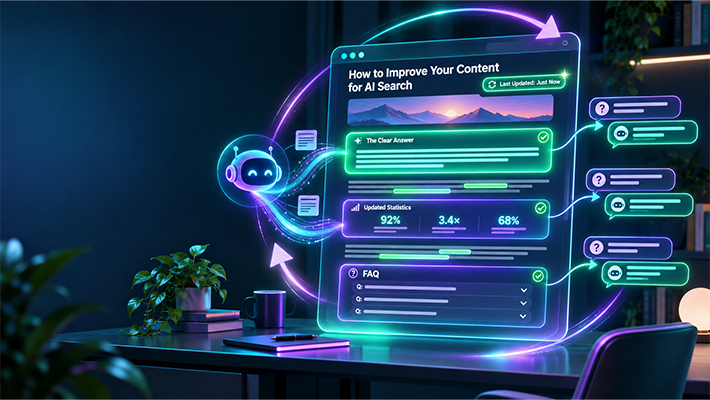
Update an old post in six steps: name its question, add a Quick Answer, sharpen headings, rewrite section openers, shorten paragraphs, and add sources. Old posts offer your fastest opportunity because they already have traffic, links, and history.
- Write down the one question the post answers.
- Add a 60-80 word Quick Answer at the top.
- Rewrite vague headings as specific labels or questions.
- Rewrite the first sentence of every section as a direct answer.
- Split long paragraphs and turn sequences into numbered lists.
- Add or update named sources, then republish and request indexing in Search Console, which asks Google to re-check the page.
How Often to Refresh
Review your top pages every quarter. Update statistics, replace dead links, and re-test your target questions. Outdated facts hurt trust, even when the structure is strong.
What to Leave Alone
Leave pages that already rank well and earn citations mostly untouched. Make small improvements only, since large changes can disrupt results you already have.
Tools to Check Your Structure
Free tools cover most structure checks.
| Tool | What It Helps You Check | Cost |
| Google Search Console | Indexing, queries, and page performance | Free |
| Rich Results Test | Whether your structured data is valid | Free |
| Hemingway Editor | Sentence length and readability | Free web version |
| ChatGPT and Perplexity | Whether AI tools cite your page | Free tiers |
| Google AI Mode | Whether your page appears as a source | Free |
| Your editor’s outline view | Heading order and skipped levels | Built in |
Start with a manual test. Ask your target question in two AI tools and record the sources, which shows your real AI answer visibility. Then use the other tools to fix gaps. For a deeper workflow, see our guide to answer engine optimization, which covers tracking in more detail.
How to Measure Whether Your Structure Works

Measure structure with a monthly citation test, Search Console impressions on question-style queries, and AI referral traffic. Then tie the results to business goals. AI answers vary, so look for trends rather than single results.
Run a Citation Test
Pick five target questions and ask each one in ChatGPT, Perplexity, and Google AI Mode. Record whether your page appears as a source. Repeat monthly and compare the results over time.
Watch Search Console
Google Search Console shows impressions, clicks, and queries for each page. Watch the pages you restructured and look for impression gains on question-style queries. Because many factors affect traffic, credit structure with only part of any gain.
Review Referral Traffic
Check your analytics for referral traffic, meaning visits that arrive from other sites, including some AI tools. Some AI tools send referral traffic, and some do not. Treat the numbers as a partial view and pair them with your citation tests.
Judge by Business Goals
Visibility matters only when it supports your goals. Track leads, signups, or sales alongside citations. If citations rise while leads stay flat, review your calls to action and page offers.
A 30-Day Plan to Structure Your Content
A four-week plan lets one person restructure five pages and test the results. Use the schedule below if you manage marketing on your own.
| Week | Focus | Output |
| Week 1 | Audit your top pages | A scored list with next actions |
| Week 2 | Rewrite top blocks and headings | Five pages with new Quick Answers |
| Week 3 | Add lists, tables, and sources | Five pages with proof and formatting |
| Week 4 | Test in AI tools and log results | A tracking sheet and next batch |
Week 1: Audit and Set a Baseline
Pull your ten highest-traffic pages from Google Search Console and score each with the five-point audit. Write down the one question each page answers. Then rank the pages by traffic and score, and choose five to restructure for AI answers. Next, run a baseline citation test: ask each target question in two AI tools and record whether your page appears. Finish with a simple tracking sheet.
Week 2: Rewrite Answers and Headings
Restructuring starts at the top of the page. Work through your five chosen pages one at a time, adding a 60-80 word Quick Answer to each. Rewrite vague headings as specific labels and rewrite the first sentence under each heading as a direct answer. Check that every passage names its topic, and read each rewrite aloud before you publish it.
Weeks 3 and 4 add formatting and proof, then test the results and plan the next batch.
Week 3: Add Formatting, Proof, and Links
Return to the same five pages. Turn sequences into numbered lists and comparisons into tables. Split any paragraph longer than four sentences. Add a named source, a statistic, or an example to every key claim. Link each page to two or three related posts with descriptive anchor text. Preview the pages on your phone, then publish and request indexing in Search Console, which asks Google to re-check the page.
Week 4: Test, Compare, and Choose the Next Batch
Repeat the baseline test from Week 1 with the same questions and tools, then compare the results. Check Search Console for shifts in impressions on question-style queries, and record which changes helped. Then pick the next five pages and start again. Each cycle makes the next one easier.
Keep a Simple Results Log
Log five columns: page, question, tool, cited or not, and date. Check the log monthly; after 30 days, it shows which changes helped. Then repeat the cycle with the next batch of pages.
What to Expect After 30 Days
Expect gradual changes because AI answers vary and indexing takes time. A good first month gives you five improved pages, a baseline log, and a repeatable process. That process turns structure into a habit. Treat early citation changes as signals rather than proof since real patterns appear only after several cycles.
Your Structure Audit Checklist
Run this checklist on every page before you publish to keep your structure consistent. Print it or paste it into your editor.
| ☐ | Write a 60-80 word Quick Answer at the top. |
| ☐ | Add 5-8 Key Takeaways in short bullets. |
| ☐ | Use one H1, then H2s and H3s with no skipped levels. |
| ☐ | Open every section with a direct answer (about 40-60 words for full blocks). |
| ☐ | Keep paragraphs to two to four sentences. |
| ☐ | Name the topic in each passage instead of relying on “it.” |
| ☐ | Use numbered lists for steps and tables for comparisons. |
| ☐ | Add a named source or example to every key claim. |
| ☐ | Add internal links with descriptive anchor text. |
| ☐ | Test your target question in two AI tools. |
The Four-Move Framework in Brief
Remember four moves: answer first, one question per section, standalone passages, and proof for every claim. Then test the result; that loop is the core of the method.
Conclusion: Start to Structure Content for AI Answers Today
AI tools favor passages that are clear, complete, and easy to quote. When you structure content for AI answers, you give those tools a reason to quote you. You also make your pages easier for people to read.
Start small. Pick one high-value post, rewrite its top block, headings, and first three sections, and test the result in two AI tools. Then repeat the process across your site, since each page you restructure adds another chance to be cited. Structure does not replace expertise, but it helps readers and AI tools see yours. Your next step: choose one page and apply the checklist today.