

Internal linking for SEO entities connects pages about related topics so search engines see how those topics fit together. Each page focuses on one main entity, such as a person, product, or concept. Descriptive anchor text inside your body copy shows how the pages relate. Over time, this structure builds topical authority and sends clearer signals to search engines and AI tools.
Key Takeaways
- Identify the core entities your site covers, such as brands, people, places, or concepts.
- Use internal links to show search engines how those entities relate.
- Plan each link around a clear relationship between two topics.
- Give each core entity one hub page, and link its supporting posts back to it.
- Write anchor text that names the entity on the target page.
- Use schema markup to link each entity to a trusted definition, such as a Wikipedia entry.
- Place most links in body copy, where surrounding words add context.
- Audit your links every few months to fix orphan pages and broken links.
Table of Contents
You’ve published dozens of helpful posts, yet your site still struggles to earn authority in search. Often, the missing piece is how your pages connect.
Search engines now read pages for meaning. They identify the people, brands, and ideas a page discusses and map how those ideas relate. Internal linking for SEO entities gives them that map.
This guide explains what entities are and how your links shape the way search engines understand them. It also gives you a six-step plan and a template for mapping your links.
What Internal Linking for SEO Entities Means

Before you build a plan, learn what entities are and how links describe their relationships.
What Is an Entity?
An entity is a single, well-defined thing that search engines recognize. It could be a person, company, city, product, or idea like content marketing. Google built its Knowledge Graph to understand real-world things and the facts that connect them (Google).
Keywords are the words people type into a search bar, and entities are the real things behind those words. The pillar on entity-based SEO explains in more depth how search engines extract and weigh entities.
How Links Signal Relationships
Internal links point from one page on your site to another. They help visitors move around and guide search engine crawlers, the bots that discover new pages. When you plan them around entities, they also show which topics belong together.
Write each planned link as a short statement that names a source topic, a relationship, and a destination topic. For example, “keyword research” reveals “search intent,” and “on-page SEO” includes “title tags.” Then let the sentence around the link spell out that relationship.
Use this relationship map as a planning tool. It helps search engines read your site, though Google decides which relationships it records.
How Schema Markup Links Entities
Schema markup, a form of structured data, supports your links through a related practice called entity linking. It connects each entity on a page to a trusted definition. That step removes ambiguity for search engines and AI systems (Schema App). For example, it tells them whether “Apple” refers to the tech company or the fruit.
Match the link to the type of entity:
- Public entities: Point sameAs to a page that confirms the entity’s identity, like its Wikipedia entry (Schema.org).
- Your own entities: Point branded products, services, and people to the page on your site that defines them best.
Schema.org also offers about for a page’s main subject and mentions for topics covered in passing (Schema.org). When your markup and your visible links name the same entities, search engines get one consistent message.
Why Internal Linking for SEO Entities Matters

An entity-focused link structure delivers four benefits:
- Faster discovery: Google finds most new pages by following links from pages it already knows (Google Search Central).
- Clearer context: The words around a link describe the target page and help search engines tell similar entities apart.
- Stronger topical authority: When every supporting post links to a hub, search engines see how deeply you cover the subject.
- Better AI visibility: AI search features must understand your pages before citing them. A connected cluster makes your coverage clear and supports your AI search visibility.
How Anchor Text and Context Define Entity Relationships
Every planned link needs the right words. Anchor text is the clickable wording of a link. It names the thing on the other end, which makes it one of your clearest entity signals.
Google recommends anchor text that is descriptive, reasonably concise, and relevant to both pages (Google Search Central). Test each anchor by reading it alone to confirm it still makes sense. The words before and after a link give Google extra context.
This table compares weak anchors with entity-focused ones.
| Weak Anchor | Entity-Focused Anchor |
| click here | entity-based SEO |
| this post | structured data for AI search |
| learn more | long-tail keyword research |
| read our guide | buyer persona template |
Keep your descriptive anchor text focused on each target page’s main entity. Link the first relevant mention of an entity, and leave later mentions unlinked.
How to Build an Internal Linking Plan for SEO Entities
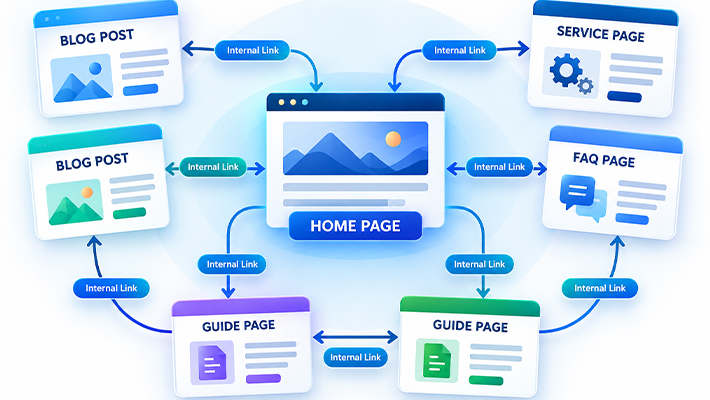
Work through these six steps in order, since each builds on the last.
Step 1: Inventory Your Core Entities
List the five to ten entities you want your site known for, such as your services, products, or main subjects. A marketing blog might list SEO, content marketing, and social media.
Next, list the smaller entities under each one. Under SEO, you might add keyword research and link building. Record everything in a spreadsheet, since later steps build on it.
If you use technical tools, Google’s Natural Language API confirms which entities a page covers. It finds known entities in your text and returns details about each one (Google Cloud).
Step 2: Map Each Entity to One Hub Page
Assign each core entity one hub page that covers the topic broadly and links to every related post. Many sites call these pillar pages or cornerstone content.
Give each page a unique pairing of entity and reader goal. When two pages compete for the same pairing, search engines may struggle to pick one. Pages with different goals can share an entity. A definition, a how-to guide, and a service page each meet a different need.
Your brand is an entity too, and your About page usually serves as its home. Link to it when you mention your business. In your Organization markup, add sameAs links to official profiles, such as LinkedIn, to confirm your identity.
Step 3: Group Supporting Posts Into Entity Clusters
Sort every existing post under the hub it supports. A post about long-tail keywords, for example, belongs in the keyword research cluster.
Four link types hold each cluster together.
| Link Type | What It Does |
| Up | Each cluster post links to its hub. |
| Down | Each hub links to every post in its cluster. |
| Across | Related cluster posts link to each other. |
| Bridge | Posts link to other clusters when topics overlap, such as SEO and content marketing. |
Linking related articles inside a cluster shows search engines the depth of your coverage (Yoast).
Step 4: Write Descriptive, Entity-Focused Anchors
For each planned link, write an anchor that names the target page’s main entity. Use a noun phrase readers recognize, such as “schema markup” or “buyer persona.”
Keep anchors to two to five words, and vary them slightly across pages. Google treats keyword-crammed anchor text as keyword stuffing, which violates its spam policies (Google Search Central).
Step 5: Place Links Inside Your Body Copy
Search engines weigh links in your main content more heavily than menu or footer links (Ahrefs).
Start a typical article with three to five contextual links, meaning links inside your paragraphs. Place them near the top, where readers click most. Add more only when a link clearly helps the reader.
A Google patent supports this approach. Its “reasonable surfer” model predicts that readers click some links more than others, based on features like position (Google Patents). Patents don’t confirm current ranking methods, but placing links where readers see them serves your audience either way.
Step 6: Audit and Maintain Your Links
Your links change every time you publish, update, or delete a post, so audit them every three to six months.
Each audit targets three problems. First, find orphan pages, which have no internal links pointing to them. Crawlers can miss these pages, and they receive no link equity from the rest of your site (Semrush). Second, fix broken internal links to deleted or moved pages. Third, replace vague anchors with ones that name the target entity.
Fix broken links first, important orphan pages second, and vague anchors third. Then link newer posts back to older, related content. Date each change so you can compare Google Search Console data before and after.
Entity Linking Map Template and Example

Turn your Step 1 spreadsheet into a linking map that holds every planned link. Use five columns, as in this entity SEO example:
| Source Page | Target Page | Target Entity | Relationship | Anchor Text |
| Entity SEO guide (hub) | Structured data guide | Structured data | Explains a key tactic | structured data for AI search |
| Structured data guide | Entity SEO guide (hub) | Entity SEO | Supports the core topic | entity-based SEO |
| Answer engine optimization guide | Structured data guide | Schema markup | Shows how to apply it | schema markup |
| Entity SEO guide (hub) | Answer engine optimization guide | Answer engine optimization | Extends it to AI answers | answer engine optimization |
| Internal linking guide | Entity SEO guide (hub) | Entity SEO | Supports the core topic | entity SEO strategy |
Add a row for each planned link, and add priority and status columns as the map grows. Sort by target page to find hubs that need more links.
Common Mistakes With Internal Linking for SEO Entities
Watch for these five mistakes as your site grows.
Leaving Orphan Pages
Orphan pages have no internal links pointing to them, so search engines and readers easily miss them. Link every published post from at least one related page.
Using Generic Anchor Text
Anchors like “click here” waste your best chance to name an entity. Replace them with the target page’s topic.
Pointing One Anchor at Competing Pages
Linking “keyword research” to three different posts sends search engines mixed signals. Point each anchor phrase at one target page, every time.
Building Dead-End Hubs
A hub that collects links but never links out traps readers and link equity. Link every hub down to each post in its cluster.
Linking Unrelated Entities
Linking a post about email subject lines to one about Core Web Vitals blurs your site’s focus. Connect pages only when their entities share a real relationship.
Tools for Mapping and Auditing Internal Links
Free tools cover the basics, and paid tools add depth as your site grows:
- Google Search Console: Shows your most-linked internal pages in the free Links report.
- Screaming Frog SEO Spider: Crawls a limited number of URLs for free and lists each page’s internal links. The paid version also flags closely related pages that should link to each other (Screaming Frog).
- Ahrefs Site Audit: Flags orphan pages and suggests internal link opportunities.
- Semrush Site Audit: Finds orphan pages by comparing its crawl with your sitemap and analytics.
Internal Linking for SEO Entities Checklist
Use this checklist each time you publish or update a post.
| ✓ | Task |
| ☐ | Confirm the post focuses on one main entity. |
| ☐ | Link the post to its hub, and link the hub back to the post. |
| ☐ | Add two to four links to related cluster posts. |
| ☐ | Write anchors that name each target entity. |
| ☐ | Place key links in the first half of the post. |
| ☐ | Point each anchor at a single target page. |
| ☐ | Add each new link to your linking map. |
| ☐ | Recheck for orphan and broken links at your next audit. |
Your Next Step: Connect Your First Cluster
Internal linking for SEO entities gives your posts a structure search engines can follow. That structure shows what you cover and how your topics relate. It also gives readers a clear path from one helpful page to the next.
Start with the entity closest to your business, such as your main service. Confirm its hub covers the topic broadly, then connect three to five supporting posts with descriptive anchors. Link the hub back to each post so the cluster works in both directions.
Log every new link in your linking map. After a few weeks, check Google Search Console for changes in impressions and clicks on that hub. Then repeat the process for your next core entity.
Each finished cluster makes the next one easier because new posts slot into a structure that already exists. Over time, search engines and readers can recognize your site as a trusted resource on your core topics.
Additional Resources
People Also Ask
What is an entity in SEO?
An entity is any distinct thing search engines can identify, like a company, a city, or a marketing concept. Search engines connect entities through facts and relationships to understand what a page covers.
Do internal links help with topical authority?
Yes. Internal links show the depth of your coverage on a subject. When supporting posts link to a central hub, search engines see that you cover the topic from many angles.
How many internal links should a blog post have?
No ideal number exists. Start a typical article with three to five contextual links. Add more only when each gives readers somewhere useful to go.
What is the difference between internal and external links?
Internal links point to pages on your own site, while external links point to other websites. Both add context, but you fully control only your internal links.
Frequently Asked Questions
Is internal linking for SEO entities different from regular internal linking?
It uses the same mechanics with a clearer purpose. Regular internal linking often aims to pass link value or keep visitors on your site longer.
Entity-focused linking plans every link around the topics each page covers. Each link connects related entities, uses anchor text that names the target topic, and supports a hub-and-cluster structure. Search engines can read the resulting link map as a picture of your expertise.
How do I find the main entities on my site?
Start with your business. List your services, your products, and the main subjects your audience asks about. These usually form your core entities and future hub topics.
Next, review your top pages in Google Search Console and note the topics they rank for. Group related queries under a shared entity. Any topic with several supporting posts but no hub page makes a strong candidate for your next hub page.
Do I need structured data if I already have strong internal links?
The two work best together. Internal links show how your pages relate. Structured data labels the entities on each page in a format machines read easily.
Begin with basic schema types, such as Organization, Person, and Article, on your key pages. Then use your linking plan to connect those pages. Together, they give search engines two consistent signals about what your site covers and how its pieces fit.
Can too many internal links hurt my SEO?
Too many links dilute the link equity each one passes and make a page harder to read. Google says no ideal number exists, but if a page feels overloaded, it probably is.
Keep the links that give readers a useful next step, such as a deeper guide or related tool. Remove links that fail to connect related entities or help readers learn more. A few strong links outperform a long, scattered list.
Should I use exact-match anchor text for internal links?
Exact-match anchors, which repeat the target keyword word for word, work well in moderation. Problems start when you repeat the same keyword-heavy anchor on every page.
Mix exact phrases with natural variations. For example, link to a keyword research guide with “keyword research,” “finding the right keywords,” or “keyword research process.” This mix keeps your links readable for people and still signals the topic to search engines.
How long does it take to see results from better internal linking?
Timing depends on how often search engines crawl your site and how many changes you make. Small sites may see shifts within a few weeks.
Larger changes, such as a full cluster rebuild, can take several months to show their full effect. Track impressions and rankings for your hub pages in Google Search Console. Then compare the data before and after each round of updates to see which changes worked.
What is an orphan page, and how do I fix it?
An orphan page is a published page that no other page on your site links to. Crawlers may miss it, and visitors rarely reach it through normal browsing.
To fix one, first decide whether the page still earns its place on your site. If it does, link to it from its hub and from two or three related posts. If it doesn’t, redirect it to the closest relevant page.
Should I add links to old posts when I publish a new one?
Yes. This step is easy to skip but worth the effort. Outside your blog index, a new post has no contextual links, so it’s harder to find.
After you publish, open your hub page and two or three related older posts. Add a contextual link to the new post in each one. Then log those links in your linking map so your next audit starts from accurate data.
Glossary
| Term | Definition |
| Anchor text | The clickable words in a link that describe the target page. |
| Entity | A distinct, identifiable thing, such as a person, brand, place, or concept. |
| Entity linking | Connecting an entity in your content or markup to a trusted definition of that entity. |
| Hub page | A broad page that covers a core topic and links to every related post. |
| Internal link | A link from one page on your site to another page on the same site. |
| Knowledge Graph | Google’s database of entities and the facts and relationships that connect them. |
| Link equity | The ranking value a link passes from one page to another. |
| Orphan page | A page with no internal links pointing to it from elsewhere on your site. |
| Topic cluster | A group of related posts that link to a shared hub page and to each other. |
| Topical authority | The trust a site earns by covering one subject in depth. |