

Quick Answer
You write engaging Instagram captions by hooking readers quickly. Instagram hides everything after the first 100 to 125 characters behind a “more” tap. Follow that hook with a personal story or a specific detail. Ask a question that invites a real answer, then conclude with one clear call to action. Match your length to your goal: keep it short and direct for quick posts, and longer for storytelling or education. Format with line breaks. Place your strongest keywords early since Instagram treats caption text as searchable content.
Key Takeaways
- Instagram hides everything after roughly 100 to 125 characters, so your opening line carries the most weight.
- Repeatable hook patterns, like a specific result or a claim, save you from a blank page.
- Specific, personal stories create a stronger connection than generic statements about your brand.
- Questions that ask for a real answer generate more comments than open-ended or yes-or-no prompts.
- AIDA and PAS give you two repeatable structures: AIDA for storytelling, PAS for offers and problem-solving posts.
- One specific call to action outperforms a caption that stacks several competing asks.
- Caption length should match your content type and goal, not a single universal rule.
- Saves, shares, and “see more” taps in Instagram Insights show what is working, not likes alone.
Table of Contents
Why Your Caption Matters More Than You Think
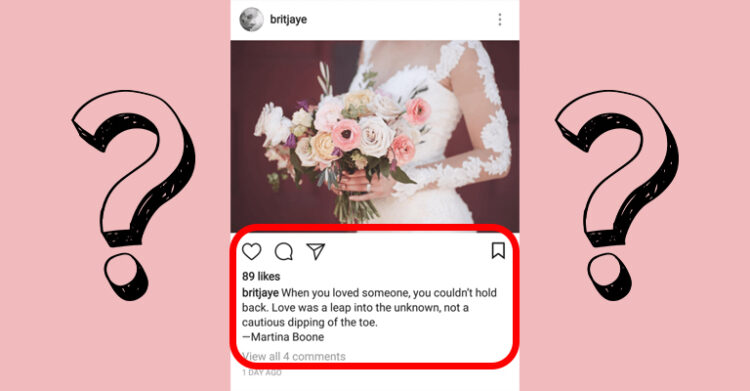
Half of U.S. adults now use Instagram, up from 40% just a few years ago (Pew Research Center), and with that many people scrolling the same feed, your photo has only seconds to capture attention. Your caption decides what happens next.
Most beginners invest an hour choosing the right filter and thirty seconds writing the caption, an order that runs backward. Images alone cannot explain your brand’s personality, answer a question, or ask for a comment.
This guide walks you through a repeatable process for writing engaging Instagram captions, teaching you to hook readers before the cutoff, connect emotionally, and ask questions that generate genuine answers. Conclude with a call to action that drives comments and saves, then use the reusable checklist at the end.
What Makes Instagram Captions Engaging
Engagement
Engagement measures how people interact with your post: likes, comments, saves, and shares. Instagram’s algorithm rewards engagement more than almost anything else you do. Posts that spark comments and saves reach more of your existing followers, and the algorithm suggests them to new people. Your caption plays a major role in that behavior, alongside your visual and your posting consistency. It succeeds even when the photo alone would not stop the scroll. Strong captions are one piece of a broader social marketing effort, not a standalone tactic.
Engagement Rate
Your engagement rate is the percentage of your audience that interacts with a given post, calculated by dividing total interactions by your follower count and multiplying by 100. Most social platforms calculate this automatically inside their analytics dashboards (Sprout Social).
Treat any specific benchmark number you see online with skepticism. Published engagement rate benchmarks vary widely between research firms, since sample size and measurement methods differ. Focus on your own account’s trend over time instead. An industry average shifts depending on who published it and when.
How to Write Engaging Instagram Captions
Hook With Your Opening Line
Instagram shows only the first 100 to 125 characters of your caption before the “more” link hides the rest (Sendible), which means that opening line functions as your headline whether or not anyone taps to read further.
Lead with your most specific detail, not a vague statement. “I almost quit this business three times” generates more attention than “Here is my journey.” Save context for later, and add it once you have secured the tap.
Recognize Proven Hook Patterns
A few repeatable hook patterns show up again and again in high-performing captions, and recognizing them gives you somewhere to start instead of a blank caption box.
- Contrarian claim: challenges a common assumption in your niche, making a reader pause before scrolling on.
- Specific-result hook: leads with a real number or outcome, not a vague claim, since concrete detail reads as more credible.
- Curiosity gap: opens a question or a partial story and holds back the resolution until the reader taps “more.”
- Targeted question: speaks directly to a specific problem your audience has, so the right readers stop scrolling.
None of these patterns work without follow-through, since a hook that promises a result or a surprising claim needs the body to deliver, or readers stop trusting your hooks. Pick one pattern per post instead of combining several, and match it to what the caption is about.
Use Emotion and Personal Storytelling
People engage with content they relate to, not content that reads like a press release. Share a specific moment, not a general lesson. Use “I” and “we” instead of writing about your brand in the third person. Skip lines such as “Acme just launched a new product.” That small shift puts your reader inside the story, not on the outside looking in.
A short structure functions well here: name the moment, describe what it felt like, then connect it to your reader. Ordinary moments count too, and a specific, honest detail wins over a polished but generic one almost every time.
Ask Questions That Invite Comments
Specific questions generate far more genuine answers than generic ones like “What do you think?” since they give your reader something concrete to respond to. Ask your audience to pick between two options, share a favorite from a short list, or guess something about you.
Direct requests perform well too, so tell your audience exactly what to do, since “Comment your city below” performs better than an open-ended prompt because readers know exactly what to say.
Apply the AIDA Formula
AIDA stands for Attention, Interest, Desire, and Action, a formula copywriting experts have used for generations, and it fits longer, story-driven captions particularly well.
Start with a line that grabs Attention, usually a question or a bold statement. Develop Interest by describing the problem or situation in more detail. Introduce Desire by showing your solution, product, or transformation. Conclude with an Action: a specific next step, like commenting, saving, or tapping the link in your bio.
Try the PAS Framework for Offers
Problem-Agitate-Solution, or PAS, fits captions that sell something or address a clear pain point. It works alongside AIDA, not in place of it, and some captions blend elements of both.
Start by naming a specific problem your audience recognizes in themselves. Invest a sentence or two on the cost of leaving that problem alone: wasted time, missed revenue, or ongoing frustration. Conclude by introducing your product, service, or approach as the resolution, paired with one clear next step.
PAS often draws more interest than a plain product description because it starts with the reader’s situation, not your offer. Save it for captions with a genuine problem to solve. A routine update or a behind-the-scenes photo calls for less structure.
Write One Specific Call to Action

A single, specific call to action pulls more engagement than a caption that stacks several competing asks. Asking a reader to comment, save, and tap the link in one caption buries what matters most. Most readers act on none of it.
Vague prompts, such as “let me know what you think,” ask your reader to invent their own response. Specific asks perform better, like “save this for later” or “tag a friend.” Choose one action, then write toward it.
Write your call to action first, then build the hook and body around it, deciding what you want the reader to do before you draft the rest of the caption. This keeps the whole post focused.
Choose the Right Caption Length
No single “ideal” caption length fits every situation, but the clearest data point favors brevity. An analysis of more than nine million Instagram posts determined that captions under 30 words earned higher engagement rates (Socialinsider), and engagement tended to drop as caption length increased across that sample. Even so, your first 100 to 125 characters need to function as a standalone hook, regardless of your final length.
Longer captions still merit their place. A practical approach: keep everyday posts concise and specific. Save longer, AIDA-formatted captions for storytelling, tutorials, or launch posts where your audience expects more context. Test both lengths on your own account. Track saves and comments, not only likes.
Format With Line Breaks
A wall of text is difficult to read on a phone screen, even when the content is good. Break your caption into short paragraphs of one to three sentences, with a blank line between each one. This keeps the caption scannable, so people read past the “more” tap instead of scrolling away.
Place Hashtags Strategically
Instagram allows up to 30 hashtags per caption, though using the maximum rarely helps. Hashtags now mainly help Instagram understand what your post is about, not a standalone way to reach new people (Later). Mid-sized hashtags with a moderate post volume usually do better than massive, overused tags.
Mix a few niche, specific hashtags with one or two broader category tags. A workable blend: one broad tag, a couple of mid-sized industry tags, and one or two narrow, relevant tags. Build your hashtag strategy around your content categories, and place tags at the end of your caption or in your first comment so they don’t interrupt your hook. Keep this consistent with your broader social content strategy so the same hashtag list works post after post.
Common Mistakes That Make Instagram Captions Less Engaging

Writing the Caption as an Afterthought
Treating your caption as a formality, not part of your content plan, usually reveals itself in the writing. Rushed captions read generic, and generic captions struggle to earn comments. Draft your caption before you finalize your visual. Set aside dedicated time for it, as you would for the rest of your content marketing strategy.
Burying Your Hook After the Cutoff
If your most important sentence sits after character 125, most readers never see it, so check every caption against Instagram’s truncation point before you post, well before after. A strong second half cannot rescue a caption that opens with filler.
Asking Vague Questions
Open-ended prompts like “Thoughts?” ask your reader to do all the work. Replace them with a specific question, or a direct request that shows readers what a good response looks like.
Skipping the Call to Action
A caption without a clear next step leaves engagement to chance, while a simple prompt, like asking readers to save the post, gives them a reason to interact.
Stacking Multiple Calls to Action
The opposite mistake is just as common: asking readers to comment, save, tap the link, and share in one caption. Competing asks split your reader’s attention, and most people respond to none of them. Pick the one action that matters most for that post.
Copying One Caption Across Every Platform
Captions written for Instagram often fall flat elsewhere, since tone, length norms, and algorithm signals differ by platform, so if you also market your small business on Twitter, tailor each caption to that specific audience.
Test and Refine Your Captions Over Time
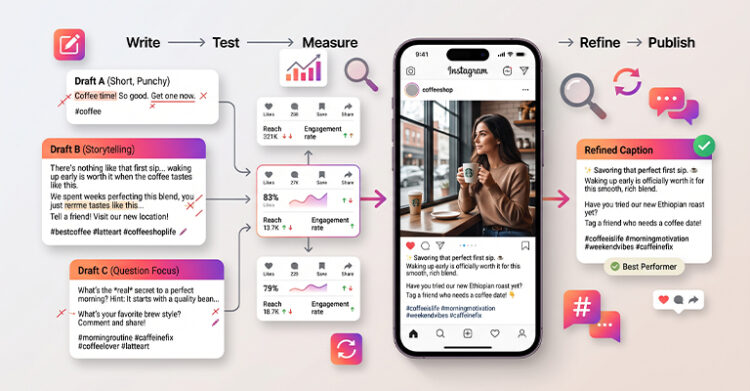
Treat caption writing as a practice you improve, not a one-time decision. Instagram’s built-in analytics tool, Instagram Insights, provides you with the data to see what is working, so trust the data over guesswork.
Track the Right Metrics
Reach from Explore indicates whether your content is finding new people beyond your current followers. Save rate and share rate reveal whether your caption earned real interaction, not a passing glance. A rising percentage of “see more” taps means your hook is working. Watch these four numbers together, not likes alone. Likes come easiest and tell you least about caption quality.
If your save and share rates climb while reach stays flat, your caption is converting the people who see it, and that happens before the algorithm expands your distribution. Keep refining that approach instead of abandoning it.
Build a Repeatable Writing Habit
Batch-write three to five captions at once when ideas come easily, not under posting-deadline pressure, and keep a running list of hooks and calls to action that performed well. That list gives you a running start, not a blank page, every time you write.
Read every caption aloud before you publish it. Anything that sounds like a press release, not something you would say to a friend, needs a rewrite. When torn between two versions, post the stronger one. Save the other for a similar post later so that you can compare results.
Your Engaging Instagram Captions Checklist
Run every caption through this list before you post.
| ☐ | First 100-125 characters work as a standalone hook. |
| ☐ | Caption includes one specific, personal detail or story. |
| ☐ | Question invites a specific answer, not a yes-or-no reply. |
| ☐ | Only one call to action appears in the caption. |
| ☐ | Length matches the content type and posting goal. |
| ☐ | Paragraphs stay short, with line breaks between them. |
| ☐ | Hashtags mix broad, mid-tier, and niche tags. |
| ☐ | Primary topic phrase appears naturally in the text. |
Turn Your Next Caption Into a Conversation

Writing engaging Instagram captions is a skill you develop with repetition, not a one-time trick. Start with the checklist above on your next three posts, and notice which hooks earn a tap. Notice which questions get real answers, and which calls to action spark comments, not silence.
Your caption habits work best as part of a broader social strategy, not a stand-alone tactic, so once your captions are consistently pulling comments and saves, look at how that content supports the rest of your plan. That includes the path from follower to customer and the platform guidelines you follow across networks, since small, consistent improvements to your captions compound into real audience growth over time.
Additional Resources
People Also Ask
How long should an Instagram caption be?
No universal ideal length exists, so match your length to your content: keep everyday posts short and use longer, story-driven captions for tutorials or launches. Always make sure your first 100 to 125 characters work on their own.
What is the best time to post an Instagram caption?
Caption quality matters more than posting time for engagement. Focus on writing captions that produce saves and comments. Those signals carry more algorithmic weight than the hour you post.
Should hashtags go in the caption or the first comment?
Either approach works, though placing hashtags in the first comment keeps your caption visually cleaner, while placing them at the end of the caption keeps everything in one place instead.
How many hashtags should I use on Instagram?
Instagram allows up to 30 hashtags, but using that many rarely improves performance, since a smaller set of specific, relevant hashtags usually performs better than a large, generic list.
Does Instagram read caption text for search?
Yes, Instagram increasingly treats caption text as searchable content, and natural, relevant keywords help your post surface in search results, not just hashtag feeds.
Frequently Asked Questions

What makes an Instagram caption engaging?
An engaging caption combines a strong hook, a specific detail, and a clear reason for your reader to respond. It works with your image instead of just describing it, adding context, personality, or a story the photo alone cannot tell.
The most engaging captions also include a direct call to action, such as a question or a request to comment. Together, these pieces turn a passive viewer into an active participant.
How do I write a caption that gets comments?
Ask a specific question your audience can answer easily, and avoid a vague one like “thoughts?” Provide people with two distinct options, or share a detail from your own experience.
Follow the question with a direct nudge, such as “comment below,” since removing ambiguity increases the odds of a reply. A clear, low-effort prompt draws more replies than an open-ended one.
What is the AIDA formula for Instagram captions?
AIDA stands for Attention, Interest, Desire, and Action, a caption structure that suits longer, story-driven posts. It guides the reader through a short narrative instead of stating one fact.
You open with a hook that grabs attention, then build interest by explaining the situation. Introduce desire by showing your solution, and conclude with a specific action, like commenting or tapping your bio link.
How many characters does Instagram show before “more”?
Instagram truncates captions at roughly 100 to 125 characters in the feed. It replaces the rest with a “more” link. Most readers never tap it unless the visible portion captures their attention first.
Because of this, your opening line should work as a standalone hook. Save supporting details, a story, or your call to action for after the cutoff point, where only interested readers look, and test your caption on mobile before posting.
Should I put a call to action in every caption?
Yes, in most cases since a caption without a clear next step leaves engagement to chance. A simple prompt, like asking readers to save the post, gives them a reason to interact.
The exception is purely visual posts where the image carries the message, since a product launch photo might need only a name, date, or price. Even then, a short prompt rarely hurts.
Does caption length affect how far my post reaches?
The clearest data point favors shorter captions. An analysis of more than nine million Instagram posts determined that captions under 30 words generated higher engagement rates. Engagement tended to drop as length increased.
Reach still depends heavily on engagement quality: saves, shares, and comments. Write your caption to secure those actions, not to hit an exact word count, and test shorter and longer versions on your own account.
How do I use hashtags without looking spammy?
Choose a small number of specific, relevant hashtags, not the maximum of 30. A mix of niche and broader tags tends to perform better than stuffing your caption with generic, high-volume ones.
Place your hashtags at the end of the caption, or in your first comment, which keeps them from interrupting your hook or the flow of your message.
Can I reuse the same caption structure for every post?
Yes, a repeatable structure like AIDA or a simple hook-story-question-action format saves time and keeps your captions consistent, while still leaving room for fresh words every time.
Swap in fresh, specific details for each post while keeping the underlying framework intact. This balances efficiency with the authenticity that makes captions feel personal, not templated or repetitive, and your audience notices the difference.
Why does my caption matter if my photo is strong?
A strong photo commands the first glance, but the caption decides what happens next. It decides whether someone scrolls past, taps to read more, or comments on your post. Images cannot ask questions or explain context on their own.
Treat your caption as part of your content, not an afterthought, since a strong visual paired with an engaging caption goes further than either element working alone.
How do I know if my captions are working?
Check Instagram Insights, the platform’s built-in analytics tool, not impression counts alone. Watch save rate, share rate, and the percentage who tap “see more.” These reflect real interest more than likes.
If saves and shares climb while reach stays flat, your content is still connecting with the people who see it. Give the same approach more time before switching strategies. Small, steady gains add up.
Glossary
| AIDA | A copywriting framework of Attention, Interest, Desire, and Action used to structure persuasive captions. |
| Call to action (CTA) | A specific instruction that tells your reader what to do next, such as commenting or saving a post. |
| Caption truncation | The point, roughly 100 to 125 characters, where Instagram hides the rest of a caption behind a “more” link. |
| Curiosity gap | A hook technique that opens a question or partial story and delays the resolution until after the reader taps to expand. |
| Engagement | Any interaction with your post, including likes, comments, saves, and shares. |
| Engagement rate | The percentage of your audience that interacts with a given post, calculated by dividing total interactions by followers. |
| Hashtag | A searchable label, marked with a #, that assists Instagram in categorizing and surfacing your content. |
| Hook | The opening line of a caption, written to capture attention before the truncation cutoff. |
| Instagram Insights | Instagram’s built-in analytics tool, used to track reach, saves, shares, and other post-level performance data. |
| Line break | A blank line inserted between paragraphs to make a caption easier to review on a mobile screen. |
| PAS | A copywriting framework of Problem, Agitate, and Solution used to structure captions around an offer or a pain point. |